

Knowing how to extend vfd service life is one of the highest-use skills a maintenance team can develop, and it is far more systematic than most facilities treat it. At Flexa Systems, we work on variable frequency drives from every major manufacturer daily, and the pattern is consistent: most premature failures are preventable. A VFD that should last 10 to 15 years often fails in five, not because of bad luck, but because of neglected cooling, ignored capacitor health, or loose electrical connections that slowly arc their way to a fault. Below, we break down exactly what causes early failure, what your maintenance schedule should look like, and how modern predictive tools change the equation entirely.
The biggest misconception about VFD longevity is that it is primarily a hardware quality issue. It is not. Brands like ABB, Siemens, Rockwell Automation, and Danfoss all produce reliable drives. What separates a drive that runs 15 years from one that fails in three is almost always the environment it lives in and the maintenance it receives.
Why VFD Service Life Matters More Than Most Facilities Realize
Operational downtime from a failed variable frequency drive is expensive in ways that rarely show up on a single line item. There is the cost of the drive itself, the cost of emergency repair or replacement, lost production hours, and the ripple effects on downstream processes. For facilities running continuous operations, even a 24-hour outage can erase weeks of maintenance budget savings.
Here is the part most guides skip: the cost of replacing a VFD is not just the purchase price. Lead times on new drives from major OEMs can stretch from weeks to months depending on the model and current supply chain conditions. A drive that fails without warning during peak production is a very different problem than one that is flagged early through predictive maintenance.
A Variable Frequency Drive is a power electronics device that controls motor speed and torque by varying the frequency and voltage of the electrical supply. Understanding what stresses the internal components is the foundation of any effective service life extension strategy.
Common VFD Failure Causes You Need to Know
Most VFD failures trace back to a small set of root causes. Identifying which ones apply to your environment is the first step in building a targeted maintenance plan.
Electrolytic Capacitor Degradation
Electrolytic capacitors are the most failure-prone components in a VFD. These components store and release energy in the DC bus circuit, smoothing voltage and supporting the drive's ability to deliver clean power to the motor. Over time, the electrolyte inside these capacitors evaporates, the oxide layer degrades, and capacitance drops. Heat accelerates this process significantly.
A drive running in an environment where the ambient temperature regularly exceeds OEM specifications will see capacitor life cut substantially. Many technicians do not discover capacitor degradation until the drive throws a DC bus fault or simply stops responding to commands. By that point, the damage is done.
Contamination and Dust Buildup
Contamination is a slow killer. Dust and debris accumulate on heat sinks, cooling fans, and circuit boards. This layer acts as insulation, trapping heat against components that need airflow to stay within thermal limits. In environments with conductive dust, such as metalworking or mining facilities, contamination also creates short-circuit paths across circuit board traces.
The fix is straightforward but requires consistency. Regular cleaning with compressed air and careful vacuuming prevents the buildup that leads to thermal derating and board-level faults. The key word is regular: a quarterly cleaning schedule is a minimum, and monthly is better in dusty environments.
Voltage Spikes and Harmonic Distortion
Voltage spikes from utility switching, lightning, or inductive load switching can destroy gate drive circuits and IGBT modules in milliseconds. Harmonic distortion, generated by the VFD itself and by other nonlinear loads on the same electrical system, creates additional thermal stress on transformers, cables, and the drive's input rectifier.
According to IEEE standards for power quality and harmonic mitigation, harmonic distortion above certain thresholds causes measurable degradation in connected electrical equipment. Surge protection devices installed on the line side of the VFD, along with harmonic filters where distortion is significant, provide meaningful protection. Products like the TCI HarmonicShield passive filter are designed specifically for this application, achieving IEEE 519 compliance and reducing thermal stress across the connected system.
VFD Environmental Requirements That Directly Impact Longevity
The environment a VFD operates in is not a background detail. It is a primary determinant of service life. Getting environmental conditions right before installation is far cheaper than managing failures after the fact.
Ambient Temperature and Heat Sink Management
Every VFD has a rated ambient temperature range, typically 0 to 40 degrees Celsius for most industrial drives, with derating required above that threshold. Running a drive at the upper edge of its thermal envelope continuously shortens capacitor life, stresses solder joints, and accelerates fan bearing wear.
Heat sink management is equally important. The heat sink is the primary thermal pathway for IGBT heat dissipation. Blocked fins, degraded thermal interface material, or inadequate airflow through the enclosure all reduce thermal performance. In high-ambient environments, enclosure cooling solutions from manufacturers like Pfannenberg provide refrigeration-based cooling that maintains precise internal temperatures regardless of external conditions.
Relative Humidity and Conformal Coating
Relative humidity above 95% non-condensing is a common OEM limit, but condensation is the real threat. A drive that experiences temperature cycling in a humid environment will eventually see moisture condense on circuit boards. This leads to corrosion, leakage currents, and eventual board failure.
Conformal coating, a thin protective layer applied to circuit boards, provides meaningful protection against humidity and chemical contamination. Many OEM drives include conformal coating as standard on boards intended for harsh environments. If your application involves high humidity or chemical exposure and your drive is not coated, this is worth addressing during the next scheduled maintenance window.
NEMA Enclosure Selection for Your Environment
NEMA enclosure ratings define the level of environmental protection a drive installation receives. A NEMA 1 enclosure is appropriate for clean, indoor environments. NEMA 12 adds protection against dust and dripping fluids. NEMA 3R is rated for outdoor use, protecting against rain, snow, and sleet.
Mismatched enclosure ratings are a surprisingly common root cause of premature failure. A NEMA 1 panel installed in a washdown area, or a standard indoor enclosure placed outdoors, will fail prematurely regardless of how good the drive inside it is. Specialized enclosures like the Hoffman WEATHERFLO, designed for outdoor VFD installations with active ventilation and a reflective finish to reduce solar heat absorption, address this problem directly.
How to Extend VFD Service Life with a Preventive Maintenance Schedule
A structured preventive maintenance schedule is the single most effective tool for extending VFD service life. The goal is to catch degradation before it becomes failure, not to respond after the drive has already tripped.

Monthly Tasks: Cleaning, Cooling Fan Inspection, and Visual Checks
Monthly tasks should be fast and focused. The goal is to catch obvious problems before they compound.
- Clean heat sinks and air intake screens using compressed air or a vacuum with a non-static nozzle. Remove all visible dust and debris.
- Inspect cooling fans for unusual noise, vibration, or reduced airflow. Fan bearing failure is one of the most common causes of thermal shutdown.
- Check enclosure door seals for damage or compression set that would allow contamination ingress.
- Review fault logs on the drive's HMI or via connected software. Repeated nuisance trips often indicate an emerging issue.
- Verify ambient temperature readings inside the enclosure match expected values for current conditions.
Annual Tasks: Tightening Electrical Connections and Capacitor Reforming
Annual maintenance goes deeper. Electrical connections loosen over time due to thermal cycling, vibration, and the natural creep of copper under sustained clamping force. Loose connections create resistance, which generates heat, which accelerates insulation degradation and can eventually cause arcing.
- Torque all power and control terminal connections to OEM specifications using a calibrated torque screwdriver. Do not guess.
- Inspect servo cables and motor leads for insulation damage, chafing, or connector corrosion.
- Perform capacitor reforming on any drive that has been stored or idle for more than 12 months. Capacitor reforming involves applying voltage gradually to rebuild the oxide layer inside electrolytic capacitors before the drive is returned to full service. Services like State Electric Capacitor Reforming follow OEM protocols from ABB, Siemens, and Rockwell Automation to document this process properly.
- Inspect grounding connections at the drive, motor, and panel. Poor grounding is a common contributor to nuisance faults and EMI-related issues.
- Test insulation resistance on motor windings and cables using a megohmmeter.
Firmware Updates and OEM Specification Reviews
Firmware updates are the most overlooked item on any VFD maintenance checklist. Drive manufacturers regularly release firmware that addresses known bugs, improves fault detection algorithms, and occasionally adds energy efficiency improvements. Running outdated firmware means missing these improvements and potentially leaving known defects in place.
Check OEM specification sheets annually as well. Application conditions change: loads shift, duty cycles evolve, and ambient conditions in a facility can change as production lines are added or modified. A drive that was correctly specified three years ago may now be operating outside its original design envelope.
Safety Protocols Every Technician Must Follow Before Servicing a VFD
Arc flash is a real and serious hazard when working on VFD panels. The energy stored in the DC bus capacitors of a large drive can remain at lethal voltage levels for several minutes after power is removed. This is not a situation where general electrical safety habits are sufficient.
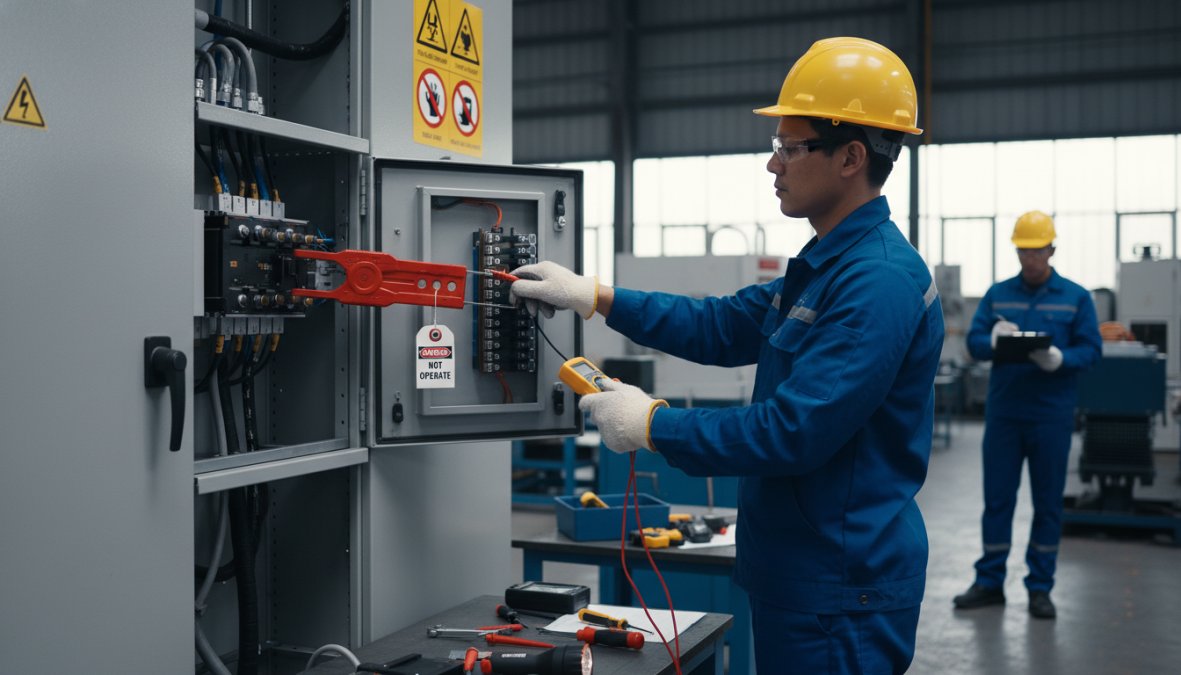
Every technician must follow these steps before opening a VFD enclosure:
- Perform a full lockout/tagout (LOTO) procedure per OSHA 29 CFR 1910.147. This means isolating all energy sources, including control power circuits, not just the main disconnect.
- Wait for the DC bus to discharge. Most drives require a minimum of five minutes after power removal. Verify with a calibrated meter before touching any internal components. Never trust indicator lights alone.
- Wear appropriate arc flash PPE based on the incident energy analysis for the panel. This includes a face shield rated for the calculated arc flash boundary, insulated gloves, and arc-rated clothing.
- Verify zero energy state with a properly rated voltmeter before beginning work.
- Do not work alone on high-energy drive systems.
As documented in OSHA's electrical safety standards for general industry, lockout/tagout procedures are mandatory for the control of hazardous energy, and violations are among the most frequently cited electrical safety failures in industrial facilities.
How to Extend VFD Service Life Using Remote Monitoring and IoT Integration
Calendar-based maintenance catches problems on a schedule. Condition-based monitoring catches the problems that matter before they become failures, regardless of when they appear on the calendar. This distinction is the core value proposition of IoT integration for VFD fleets, and it represents the largest shift in how to extend VFD service life that has occurred in the past decade.
The underlying principle is straightforward: a VFD generates a continuous stream of operational data, output current, DC bus voltage, heatsink temperature, fan speed, fault history, run hours, that most facilities never capture or analyze. Remote monitoring platforms collect this data, establish baseline behavior for each individual drive, and flag deviations from that baseline before they cross the threshold into a fault condition.
What Data Points Actually Matter for Predictive Maintenance
Not all drive data is equally useful for predicting failure. The parameters with the highest diagnostic value for the most common failure modes are:
Heatsink temperature trend over time. A drive whose heatsink temperature at a given load point is rising by 2-3°C per month is telling you that thermal resistance is increasing, almost always due to dust accumulation on the heatsink fins or cooling fan bearing degradation. The absolute temperature may still be within spec; the trend is the signal.
Cooling fan speed or current draw. Many modern drives monitor fan speed via tachometer feedback or fan motor current. A fan running at reduced speed under the same thermal load it previously handled at full speed is a bearing wear indicator. This is one of the most reliable early-warning signals available because fan failure is a leading cause of thermal shutdown.
DC bus voltage ripple. As electrolytic capacitors age and lose capacitance, the DC bus voltage ripple increases. Some drives expose this parameter directly; others allow it to be inferred from DC bus voltage fluctuation logged at high sample rates. A rising ripple trend is a direct indicator of capacitor health degradation before the capacitor reaches the point of causing a fault.
Output current imbalance across phases. A growing imbalance between the three output phases, even within the drive's operating limits, can indicate a developing IGBT gate drive issue or a motor winding problem that will eventually produce an overcurrent or output phase loss fault.
Cumulative run hours and thermal cycles. Fan bearings, capacitors, and IGBT modules all have life ratings expressed in operating hours or thermal cycles. A monitoring system that tracks actual runtime against OEM component life ratings can generate replacement recommendations based on real usage rather than calendar assumptions.
Three Tiers of Remote Monitoring: Choosing the Right Approach
Not every facility needs the same level of monitoring infrastructure. The right approach depends on fleet size, criticality of the driven equipment, and existing network infrastructure.
Tier 1, Native drive connectivity (lowest barrier to entry). Many current-generation VFDs from ABB (ACS880, ACS580), Siemens (SINAMICS G120, S120), Danfoss (FC302, FC102), and Rockwell Automation (PowerFlex 525, 755) include built-in Ethernet ports and support for industrial protocols including EtherNet/IP, PROFINET, and Modbus TCP. For these drives, remote monitoring requires only network connection, configuration of the relevant data objects, and a SCADA or cloud platform to receive and store the data. No additional hardware is needed.
Tier 2, Third-party monitoring hardware for legacy drives. Older drives without native network connectivity can be retrofitted with external monitoring hardware that reads analog and digital I/O signals from the drive and transmits them to a cloud platform. Devices in this category typically clamp onto existing wiring without requiring drive modification. This approach extends the useful life of legacy drives by adding condition monitoring capability that was not available when they were manufactured.
Tier 3, Dedicated predictive maintenance platforms. For facilities managing large VFD fleets or drives on critical equipment, dedicated platforms provide AI-based anomaly detection, automated alert routing, and fleet-wide dashboards. Rockwell Automation's FactoryTalk Analytics includes built-in algorithms for fan life prediction and capacitor health monitoring based on actual operating hours and thermal history. ABB Ability Smart Sensor and ABB Ability Condition Monitoring provide similar capability within the ABB ecosystem. These platforms are most cost-effective when the cost of a single unplanned outage on a critical drive exceeds the annual platform subscription cost, a threshold that most continuous-process facilities cross easily.
Implementation: Getting a Drive onto Remote Monitoring in Practice
For a facility starting from zero, the practical implementation sequence for a native-connectivity drive is:
- Identify the drive's supported communication protocol from the nameplate or OEM documentation. Most modern drives support multiple protocols; match the protocol to your existing plant network infrastructure.
- Assign a static IP address to the drive within your plant network subnet. Document this address in your asset register alongside the drive's serial number and location.
- Configure the drive's data objects to expose the parameters you want to monitor. At minimum: heatsink temperature, output current (all three phases), DC bus voltage, fault history buffer, and run hours. Most drives expose these as standard objects; the configuration is typically done through the drive's HMI or commissioning software.
- Connect the drive to your SCADA, historian, or cloud platform using the configured protocol. Verify data is being received at the expected polling interval.
- Establish baselines by logging normal operating data for two to four weeks across the full range of typical load conditions. Anomaly detection is only meaningful relative to a known baseline.
- Configure alert thresholds for the parameters with the highest failure-prediction value: heatsink temperature trend, fan speed deviation, and DC bus voltage ripple. Set thresholds to alert at a meaningful deviation from baseline, not at the OEM's fault threshold, by the time the drive is about to fault, the predictive value is gone.
The Practical ROI of Condition-Based Monitoring
The business case for remote monitoring rests on a straightforward comparison: the cost of the monitoring infrastructure versus the cost of the unplanned downtime it prevents. For drives on non-critical equipment in facilities with flexible production schedules, the ROI calculation may not favor a full Tier 3 platform. For drives on critical equipment, cooling towers, compressors, pumps serving continuous processes, a single prevented failure typically covers the monitoring cost for multiple years.
The secondary benefit is maintenance labor efficiency. A facility managing 20 or more VFDs on a purely calendar-based schedule sends technicians to inspect drives that are operating perfectly while potentially missing a drive that is degrading between inspection intervals. Condition-based monitoring inverts this: technicians are dispatched when data indicates a specific drive needs attention, not on a fixed schedule regardless of drive health.
Troubleshooting Common VFD Fault Codes Before They Become Failures
Fault codes are the drive's diagnostic language. Most facilities treat them as alerts to clear and move on. The better approach is to treat every fault code as a data point about the drive's health trajectory, a recurring fault in the same category is almost always more informative than any single event. Log fault codes with timestamps, note the operating conditions at the time of the trip, and review the pattern quarterly.
The table below maps the most common fault categories to their root causes, the on-drive parameters worth checking first, and the corrective action that resolves the majority of cases. Exact fault code numbers vary by manufacturer (Allen-Bradley uses F-codes, ABB uses fault words, Siemens SINAMICS uses Fxxxxx/Axxxxx notation), but the underlying mechanisms are consistent across platforms.
| Fault Category | Common Trigger | First Parameter to Check | Most Likely Root Cause | Corrective Action |
|---|---|---|---|---|
| Overcurrent (OC) | Startup or acceleration | Acceleration ramp time | Ramp too aggressive, mechanical jam, or degraded motor insulation | Extend accel ramp; megohmmeter test on motor and cable |
| Overvoltage (OV) | Deceleration | Deceleration ramp time, DC bus voltage | Load inertia exceeds braking capacity | Extend decel ramp; add or verify braking resistor sizing |
| Overtemperature (OH/OT) | Mid-run or high-load periods | Heatsink temp sensor reading, ambient temp | Blocked heatsink, failed cooling fan, or ambient exceedance | Clean heatsink; replace fan; verify enclosure cooling |
| Ground Fault (GF) | Startup or during run | Insulation resistance log | Degraded cable jacket or motor winding insulation | Megohmmeter test on motor leads and cable; isolate source |
| DC Bus Undervoltage (UV) | Startup or during run | Input voltage at L1/L2/L3 | Utility voltage sag, loose input terminal, or blown input fuse | Check input voltage under load; torque input terminals |
| Communication Fault | Any time | Network status indicator, node address | Loose fieldbus cable, address conflict, or network timeout | Reseat fieldbus connector; verify node address and baud rate |
| Output Phase Loss | During run | Output current on all three phases | Loose output terminal, open motor lead, or failed IGBT | Check output terminal torque; test IGBT gate signals |
Reading Fault Patterns, Not Just Fault Events
A single overcurrent fault on a Monday morning after a weekend shutdown is usually a nuisance, the motor was cold, the load was stiff, and the ramp caught it. The same overcurrent fault appearing three times in a single shift, with no change in load or ambient conditions, is a different signal entirely. The fault is the same; the pattern is the diagnosis.
Practical pattern-reading rules:
- Faults that appear only at startup point to ramp parameters, motor insulation, or mechanical binding, not to thermal or power quality issues.
- Faults that appear only at full load point to thermal derating, current limit settings, or a motor that is undersized for the actual duty cycle.
- Faults that appear at random with no load correlation often point to power quality, voltage sags, transient spikes, or harmonic distortion affecting the input rectifier or DC bus.
- Faults that appear only in summer or during peak production are almost always thermal. The drive is operating within spec in cooler conditions and hitting its thermal limit when ambient rises.
Overcurrent Faults: The Diagnostic Sequence
Overcurrent faults deserve extra attention because they are the most common fault type and the most frequently misdiagnosed. The reflex is to extend the acceleration ramp and clear the fault. That resolves the symptom without addressing the cause in a significant percentage of cases.
Work through this sequence before adjusting any parameter:
- Check for a mechanical jam or high-friction condition on the driven load. Rotate the shaft by hand if safe to do so. Resistance that was not present previously is a mechanical problem, not a drive problem.
- Run a megohmmeter test on the motor and cable at 500V or 1000V DC, depending on the motor voltage rating. A reading below 1 megohm on a 480V motor indicates insulation degradation that will continue to worsen. Adjusting the ramp will not fix this.
- Check the drive's output current waveform if the drive supports it, or use a clamp meter on all three output phases. An imbalance greater than roughly 5% between phases suggests a failing output phase or a motor winding issue, not a ramp problem.
- Only after ruling out mechanical and insulation causes should you adjust the acceleration ramp time or current limit parameters.
Overtemperature Faults: Do Not Just Clear Them
An overtemperature fault is the drive telling you it cannot shed heat fast enough. Clearing the fault and restarting without finding the thermal cause guarantees the fault will return, and each thermal cycle above the component rating accelerates capacitor degradation and solder joint fatigue.
When an OH fault appears:
- Read the heatsink temperature from the drive's parameter list before clearing the fault. Most drives log the peak temperature at the time of the trip. Compare this to the OEM's thermal shutdown threshold (typically 85-95°C on the heatsink for most industrial drives).
- Check the cooling fan while the drive is de-energized and locked out. Spin the fan blade by hand. Any roughness, grinding, or wobble indicates bearing wear. A fan that spins freely but was not moving air during operation has likely lost its start capacitor or motor winding.
- Inspect the heatsink fins with a flashlight. Dust loading that reduces fin-to-fin airflow by even 30-40% can raise heatsink temperature enough to cause nuisance tripping under full load.
- Verify the enclosure ambient temperature with a calibrated thermometer, not the drive's internal sensor. If the enclosure interior is running above the drive's rated ambient (commonly 40°C for most industrial drives), the enclosure cooling solution needs to be upgraded, not the drive parameters adjusted.
Ground Fault Codes: Isolating the Source
A ground fault code indicates current is finding a path to ground outside the intended circuit. The two most common sources are degraded motor cable insulation and degraded motor winding insulation. Distinguishing between them before pulling the motor saves significant diagnostic time.
- Disconnect the motor leads at the drive output terminals (with the drive locked out and DC bus discharged).
- Perform a megohmmeter test from each output terminal to ground with the motor disconnected. A low reading with the motor disconnected points to the cable. A good reading with the motor disconnected points to the motor windings.
- If the cable tests good and the motor tests good individually, reconnect and test the full circuit. A ground fault that only appears under the combined circuit suggests a connector or terminal issue at the motor junction box.
As documented in Rockwell Automation's technical documentation on VFD fault diagnosis, a pattern of recurring faults in the same category is almost always more informative than any single fault event. Building a fault log, even a simple spreadsheet with date, fault code, ambient temperature, and load conditions, transforms reactive troubleshooting into predictive maintenance.
VFD Lifecycle Cost Analysis: Repair vs. Replace
The repair versus replace decision is where many facilities leave significant money on the table. The reflex to replace a failed drive with a new one feels safe, but the total cost of ownership math often tells a different story.
A new VFD from a major OEM carries a purchase price that is typically three to five times the cost of a professional component-level repair for the same unit. Add in the lead time for a new drive, which can run weeks to months for some models, and the operational cost of waiting becomes substantial.
| Decision Factor | Repair | Replace |
|---|---|---|
| Typical cost | Fraction of new price | Full OEM price |
| Lead time | Days to weeks | Weeks to months |
| Warranty | Up to 2 years (Flexa Systems) | OEM standard |
| Risk | Known component history | New unit, new startup risk |
| Best for | Drives in good physical condition | End-of-life or obsolete units |
The case for repair is strongest when the drive is physically sound, the failure is component-level rather than catastrophic, and a replacement would require re-engineering the installation. Flexa Systems performs component-level repair on VFDs from all major manufacturers, with free diagnostics, a 2-year warranty, and 24 to 72-hour rush service available for critical applications. For many facilities, this represents savings of up to 70% compared to purchasing new equipment.
The case for replacement is clearest when a drive is genuinely obsolete, when parts are no longer available, or when the failure has caused physical damage to the drive chassis or bus bars that makes repair impractical.
A practical VFD maintenance checklist to use at your facility:
Monthly:
- Clean heat sinks and intake screens
- Inspect cooling fans for noise or reduced airflow
- Check enclosure seals
- Review drive fault logs
- Verify enclosure ambient temperature
Annual:
- Torque all power and control terminal connections to OEM spec
- Inspect motor cables and servo cables for insulation damage
- Perform capacitor reforming on idle or stored drives
- Verify grounding at drive, motor, and panel
- Test motor insulation resistance
- Check for available firmware updates
- Review OEM specifications against current application conditions
As-Needed:
- Install surge protection if not already present
- Evaluate harmonic mitigation if nuisance tripping is occurring
- Upgrade NEMA enclosure rating if environment has changed
- Implement remote monitoring if managing three or more drives
For facilities looking to benchmark their approach against industry standards, the NEMA standards for enclosures and motor control equipment provide a useful reference for environmental protection requirements and installation best practices.
Keeping a variable frequency drive running reliably for its full design life requires consistent attention to environment, maintenance, and early fault intervention. When a drive does eventually need service, the repair versus replace decision deserves a real cost analysis, not a reflex. Flexa Systems provides component-level VFD repair with free diagnostics, a 2-year warranty, and rush turnaround options that minimize production downtime. Get a quote from Flexa Systems and keep your drives running at full capacity.
Frequently Asked Questions
What is the typical service life of a VFD?
A Variable Frequency Drive can last anywhere from 7 to 15 years or more, depending on the operating environment, maintenance quality, and load conditions. Drives installed in clean, temperature-controlled environments with consistent preventive maintenance schedules tend to reach the higher end of that range. Neglected drives in harsh industrial environments often fail well before 7 years. Following OEM specifications from manufacturers like ABB, Siemens, or Rockwell Automation is the most reliable way to maximize motor control equipment longevity.
What are the most common causes of VFD failure?
The most common VFD failure causes include electrolytic capacitor degradation, overheating due to poor ventilation or high ambient temperature, contamination from dust and debris blocking heat sinks, loose electrical connections causing resistance and arcing, voltage spikes from utility switching, and harmonic distortion from connected loads. Humidity damage and inadequate grounding are also frequent culprits. Addressing these through a structured VFD maintenance checklist dramatically reduces unplanned operational downtime and extends drive service life.
How often should VFDs be serviced?
At a minimum, VFDs should receive a visual inspection and dust removal monthly, with more thorough servicing every 6 to 12 months. Annual tasks should include tightening electrical connections, inspecting cooling fans, checking capacitor health, and reviewing firmware updates per OEM specifications. VFDs in harsh environments, high heat, humidity, or heavy contamination, may require more frequent attention. Implementing predictive maintenance tools can help shift from calendar-based to condition-based servicing for better efficiency.
Does heat affect VFD lifespan?
Yes, heat is one of the single biggest threats to VFD service life. Elevated ambient temperature accelerates the degradation of electrolytic capacitors, reduces thermal performance of the heat sink, and stresses cooling fans and circuit boards. Most VFDs are rated for operation up to 40°C (104°F), and exceeding this threshold causes thermal derating or outright failure. Proper ventilation, NEMA enclosure selection, and active cooling solutions are essential VFD environmental requirements for any installation in a warm or enclosed space.
Can cleaning a VFD extend its life?
Absolutely. Dust and debris accumulation on heat sinks, cooling fans, and circuit boards is a leading cause of overheating and premature failure. Regular cleaning using compressed air or vacuuming, with care to avoid static electricity discharge, removes contamination that restricts airflow and causes thermal stress. Cleaning should be part of every monthly VFD maintenance checklist. For drives in particularly dirty environments, more frequent cleaning cycles and conformal coating on circuit boards provide additional protection against contamination-related damage.


